

What's New
We’ve been working hard to make Toasty smoother, smarter, and more intuitive for everyone.
Here’s what’s fresh this month — designed to save you time and make managing rewards feel effortless.
December 11, 2025
Personalized Variables in Subject Lines
Crafting meaningful reward emails just got an upgrade.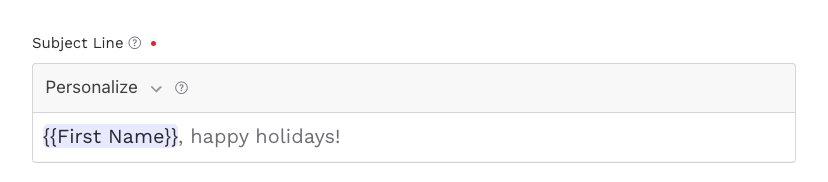
You can now personalize your subject lines with First Name, Last Name, Department Name, and Company Name tokens, helping every message feel extra personal.
More relevance in fewer clicks.
Two New Personalized Variables for Messages
Your messages just became more customizable.


Alongside existing tokens, you can now insert Department Name and Company Name directly into the message body.
A small touch that goes a long way.
Send Rewards With No Message
In a hurry? No problem.
You can now send rewards without including a message — perfect for quick incentives or simple value transfers where speed matters most.
Fast, flexible, and friction-free.
Email Template Upgrade: Add a Default Message
Make recurring rewards effortless.

You can now save a default message in your email template, ensuring consistency every time you send — especially helpful for birthday gifts, anniversaries, or monthly incentives.
One setup, endless re-use.
Edit Recipient Information on the Fly
Fix mistakes without starting over.
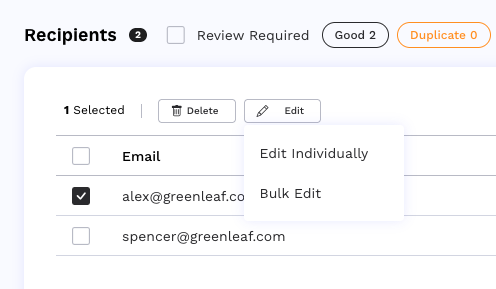
You can now edit recipient details directly in your Recipients List — no need to delete and re-add contacts.
And if you're updating multiple people? Enjoy the convenience of bulk editing for fields like department or company.
Less manual work, more accuracy.